PortSwigger Academy Labs Walkthrough
A walkthrough series of PortSwigger Web Security Academy labs, covering the topics included in the Burp Suite Certified Practitioner (BSCP) exam.
To browse all labs in this series, visit the full PortSwigger series.
All testing shown in this series is performed against PortSwigger Academy’s intentionally vulnerable labs.
Do not apply these techniques to systems you do not own or have explicit written permission to test.
Introduction
What’s this?
PortSwigger Web Security Academy is a free online training platform created by the makers of Burp Suite. It covers a wide range of web application security topics through guided reading material and hands-on labs that simulate real-world vulnerabilities. Each topic includes a theory section explaining how the vulnerability works, its root causes, and its potential impact, followed by one or more labs that require you to exploit it.
This series documents my walkthrough of the Web Security Academy labs as I prepare for the Burp Suite Certified Practitioner (BSCP) certification. The BSCP is an exam that tests your ability to find and exploit web vulnerabilities in a realistic time-constrained environment using Burp Suite. It covers a broad set of vulnerability classes and requires both solid methodology and good tool fluency.
I am focusing on the labs included in the official BSCP learning paths, skipping expert-level labs that are out of scope for the certification for now. The coverage will grow as I work through more topics.
Who is this for?
This walkthrough is aimed at:
- Students and professionals preparing for the BSCP exam
- Pentesters and red teamers revisiting web application fundamentals
- Anyone learning web security through hands-on labs
Familiarity with HTTP, how web applications work, and basic Burp Suite usage is assumed. If you are completely new to Burp, the setup section below will get you started.
How to use this series?
- Each vulnerability category is documented in its own post
- Within each post, labs are documented individually with objective, approach, and key takeaways
- Labs can be followed in order or referenced independently
- Screenshots and payloads are included for clarity
- Small differences may appear between lab runs as PortSwigger randomizes some lab values
Burp Suite Setup
The labs run in your browser, intercepted through Burp Suite. If you have not set it up yet, here is the quick version:
- Download Burp Suite from PortSwigger. The Community edition works for most labs but for the actual BSCP exam you need Professional.
- Open Burp and confirm the proxy listener is active under
Proxy > Proxy Settings. The default is127.0.0.1:8080.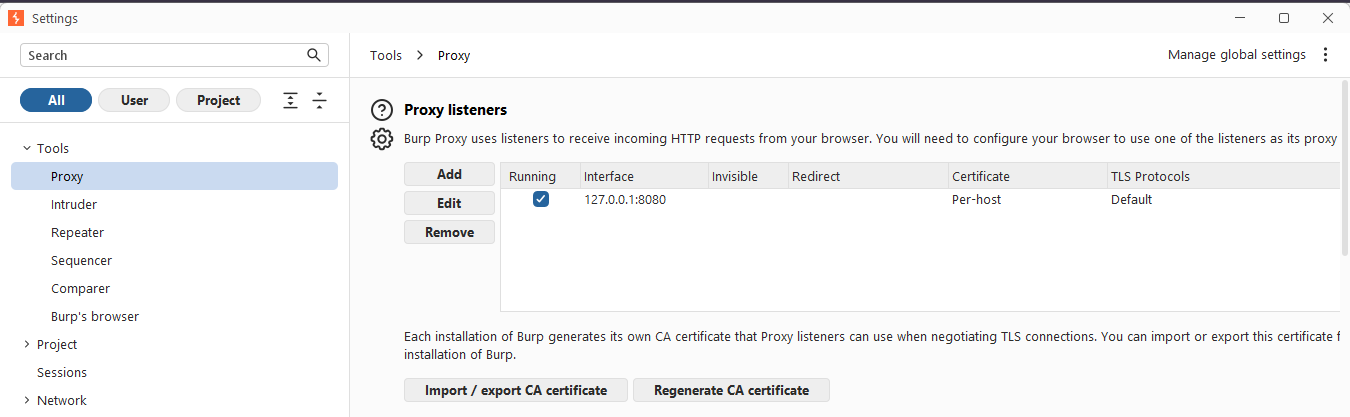
- Install the FoxyProxy browser extension. Add a new proxy entry:
- Name:
burp - Type:
HTTP - Hostname:
127.0.0.1 - Port:
8080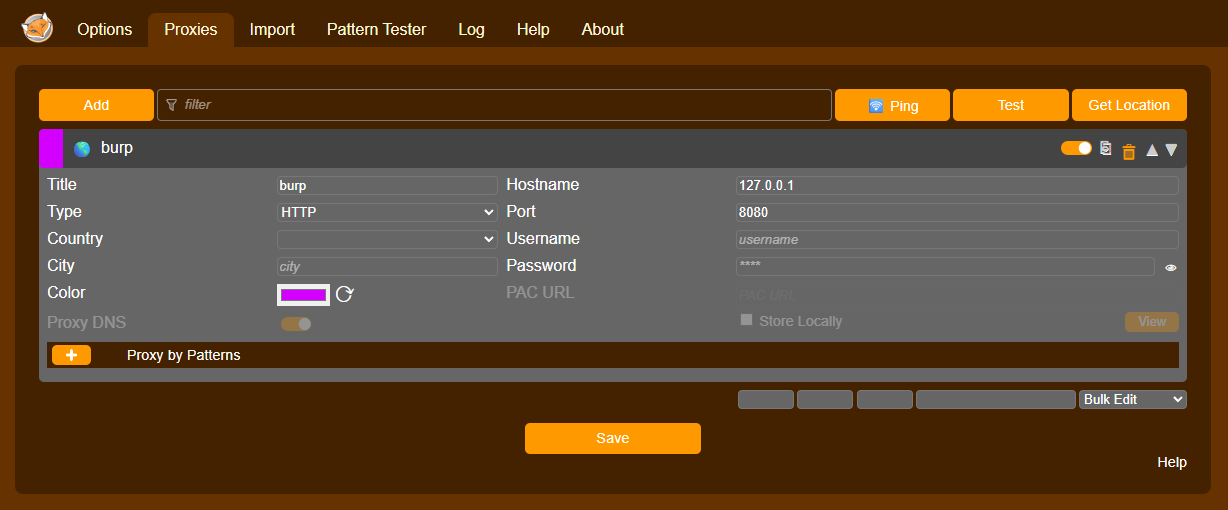
- Name:
- With the proxy enabled in FoxyProxy, navigate to
https://burpin your browser. Download the Burp CA certificate and install it in your browser’s certificate store (or Windows certificate manager). - That’s it. Your browser traffic will now route through Burp and appear in the Proxy history.
Make sure to set the proxy filter to show all requests, including image requests (
Proxy > HTTP history > Filter). Some labs, like path traversal, inject the vulnerability through image-loading endpoints that are hidden by default filters.
Labs Walkthrough
This is a Work In Progress, if you are looking for something that should be here it should be in process. You can always ping me and ask!
Authentication Vulnerabilities
Username enumeration, brute-force protection bypasses, 2FA flaws, password reset logic errors, and stay-logged-in cookie abuse.
- Username enumeration via different responses
- Username enumeration via subtly different responses
- Username enumeration via response timing
- Broken brute-force protection, IP block
- Username enumeration via account lock
- 2FA simple bypass
- 2FA broken logic
- Brute-forcing a stay-logged-in cookie
- Offline password cracking
- Password reset broken logic
- Password reset poisoning via middleware
- Password brute-force via password change
Path Traversal
Reading arbitrary files on the server by manipulating file path parameters, and bypassing common defenses like sequence stripping and extension validation.
- File path traversal, simple case
- File path traversal, traversal sequences blocked with absolute path bypass
- File path traversal, traversal sequences stripped non-recursively
- File path traversal, traversal sequences stripped with superfluous URL-decode
- File path traversal, validation of start of path
- File path traversal, validation of file extension with null byte bypass
Server-Side Request Forgery (SSRF)
Forcing the server to make requests to internal or external systems, bypassing access controls and exposing internal infrastructure.
- Basic SSRF against the local server
- Basic SSRF against another back-end system
- SSRF with blacklist-based input filter
- SSRF with filter bypass via open redirection vulnerability
- Blind SSRF with out-of-band detection
Cross-Origin Resource Sharing (CORS)
Misconfigured CORS policies that allow untrusted origins to read sensitive cross-domain responses.
- CORS vulnerability with basic origin reflection
- CORS vulnerability with trusted null origin
- CORS vulnerability with trusted insecure protocols
WebSockets
Manipulating WebSocket messages and handshakes, and hijacking connections cross-site to abuse authenticated sessions.
- Manipulating WebSocket messages to exploit vulnerabilities
- Manipulating the WebSocket handshake to exploit vulnerabilities
- Cross-site WebSocket hijacking
Web LLM Attacks
Abusing excessive agency and chaining classic web vulnerabilities through APIs exposed to an LLM.
- Exploiting LLM APIs with excessive agency
- Exploiting vulnerabilities in LLM APIs
- Indirect prompt injection
- Exploiting AI agents to perform destructive actions
- Exploiting AI agents to exfiltrate sensitive information
- Exploiting AI agents to trigger secondary vulnerabilities
- Bypassing AI scanner defenses to exfiltrate sensitive information
References
- PortSwigger Web Security Academy
- BSCP exam information
- Burp Suite documentation
- AI (Claude, Perplexity, local models)